Screens App Turns the iPhone Duo Into a Tiny MacBook
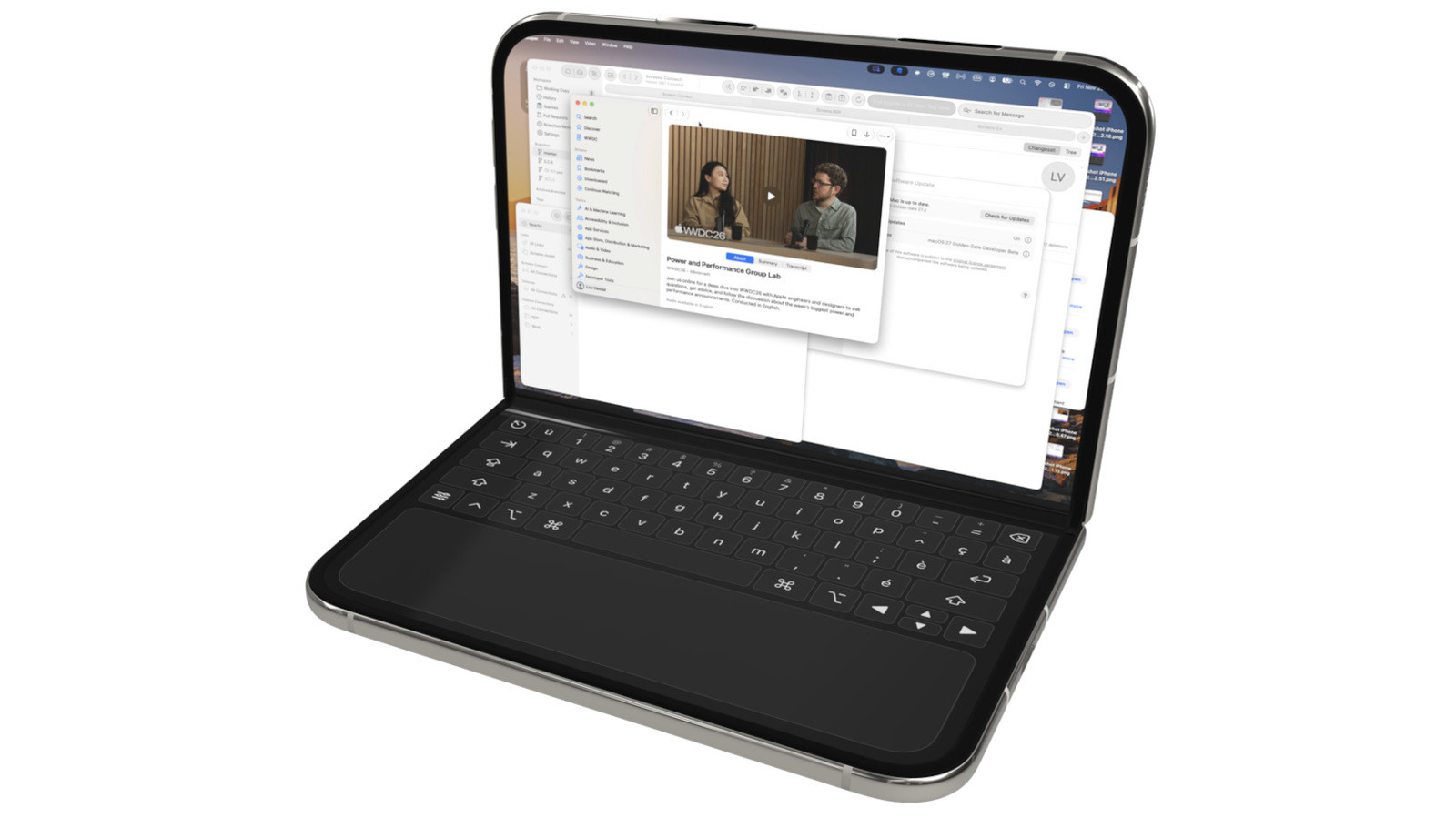
Edovia's latest remote desktop app update introduces a Laptop Mode, transforming the folding iPhone Duo into a miniature notebook with a digital keyboard and trackpad.
 📱Phones
Photo: engadget.com
Key points
- Screens version 5.10.6 introduces Laptop Mode for the iPhone Duo
- Splits display into a remote desktop view and a lower keyboard/trackpad combo
- Includes multilingual typing and trackpad gesture support
Edovia has rolled out version 5.10.6 of its remote desktop application, Screens, bringing a novel Laptop Mode designed specifically for the folding iPhone Duo. When users position the device in a partially open clamshell configuration, the software splits the display. The upper half projects the remote desktop view, while the bottom section converts into a functional keyboard and trackpad.
The integrated keyboard offers multilingual support along with swipe-down gestures for alternative characters, mirroring the typing experience found on iPadOS. Meanwhile, the lower display area functions as a trackpad supporting the application's signature navigation gestures. While this digital setup cannot fully replicate the tactile feedback of physical hardware, it serves as a viable option for quick tasks and short messages.
This innovative utilization of the folding form factor highlights how software developers are beginning to adapt to novel hardware designs. However, adapting apps for the unique display geometry remains a hurdle for some major platforms, with Instagram head Adam Mosseri recently noting the difficulty of optimizing experiences for such devices.
Should you buy it?
For users who frequently rely on remote desktop access and own the iPhone Duo, downloading the updated Screens app offers a clever way to boost productivity on the go without carrying extra gear.
Source engadget.com — engadget.com/2329115/the-screens-app-will-let-you-turn-your-iphone-… ↗
Read next
 📰Gadget News
XPeng unveils IRON humanoid robot with plans for public launch by 2027
Electric vehicle manufacturer XPeng has introduced its new humanoid robot, IRON, targeting a commercial debut in 2027 with a price point comparable to an entry-level EV.
 📰Gadget News
OM System Expected to Upgrade Micro Four Thirds Sensor Technology
Reports suggest OM System is moving toward higher-resolution sensors for its Micro Four Thirds lineup, potentially reaching up to 100 megapixels.
 📰Gadget News
Casio Expands Availability of Mesh-Band LA680 Vintage Watches
Casio has brought its refreshed LA680 vintage digital watch series to the Japanese market, featuring new stainless-steel mesh bands.
 📰Gadget News
Nvidia Reportedly Planning Further GPU Supply Reductions
Rumors suggest Nvidia may decrease gaming GPU shipments by up to 30% through early 2027, potentially driving up prices for consumers.
 📰Gadget News
WhatsApp to Integrate Travel eSIM Purchases Directly Within the App
WhatsApp is launching a new feature allowing users to buy and install international travel eSIMs without leaving the messaging platform.
 📰Gadget News
Seiko Launches 7th Philippine Limited Edition Prospex Chronograph
Seiko has unveiled the HBJ006P1, a new limited-edition Prospex chronograph inspired by the Pan-Philippine Highway.