Apple HomeView Launch Details Reveal Face Recognition Limits, Control Center Features, and Sleep Timers
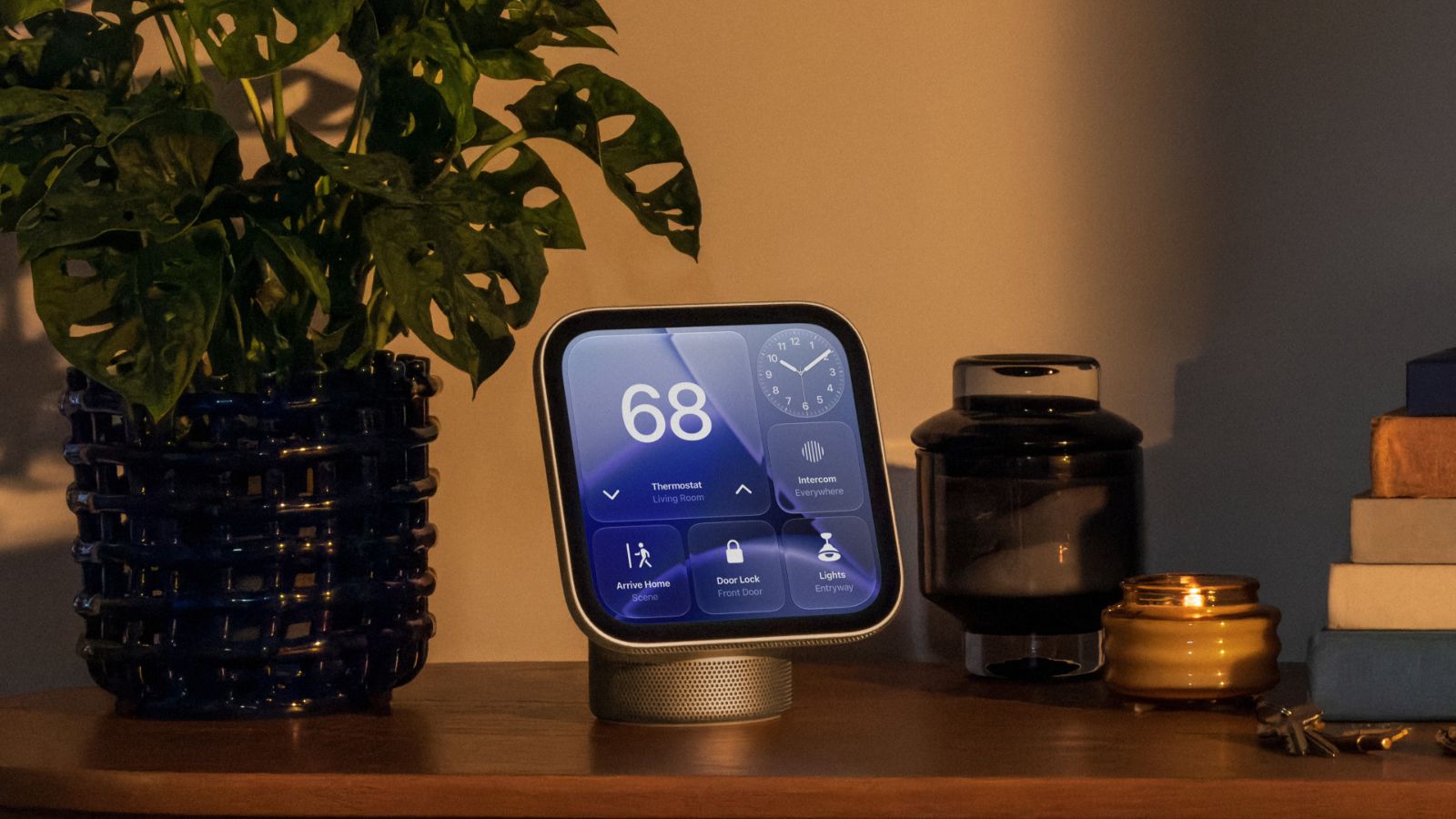
Apple's new HomeView smart hub is now available, bringing fresh details regarding its facial recognition capabilities, guest permissions, interface options, and hardware controls.
 🏠Smart Home
Photo: MacRumors
Key points
- HomeView requires clear facial visibility without sunglasses for recognition.
- A built-in Mirror utility helps users frame themselves using zoom and edge lighting.
- The hub features no physical power button and relies entirely on software or unplugging for reboots.
Apple's newly released HomeView smart hub brings a range of features alongside specific operational quirks for users setting up the device at home. According to Apple's guidelines, the hub's facial recognition system requires users to be centered in the frame, closest to the camera, and free of facial coverings like sunglasses. The device also demands proper front-facing lighting and must be free from physical obstructions such as overhanging cabinets or shelves.
To assist with camera positioning and personal grooming, the Control Center includes a dedicated Mirror tool equipped with 1x and 2x zoom options, plus an edge light feature to brighten faces in dim environments. For security, HomeView authenticates individuals via facial recognition combined with a nearby, recently unlocked iOS device on the same Wi-Fi network, though cellular connectivity can serve as a backup during outages. Owners can also configure custom access levels for guests.
Media playback can be managed using a built-in sleep timer to automatically pause audio or video, while website and app logins mirror the streamlined Apple TV experience by using a nearby iPhone. The interface features adjustable Liquid Glass transparency akin to iOS and macOS. Notably, the hardware lacks a physical power or restart button, meaning device reboots must be handled via the Settings app or by power cycling the unit.
- Facial recognition fails if the camera is blocked, lighting is poor, or the user wears sunglasses.
- The Control Center features a Mirror tool with zoom and edge lighting.
- Device lacks a physical power button; restarts require the Settings menu or unplugging.
Source MacRumors — macrumors.com/2026/11/13/homeview-tidbits-2/ ↗
Read next
 ⌚Wearables
Apple Launches Health AI Study App for iPhone and Apple Watch Users
Apple has rolled out a dedicated application for its new Health AI Study, inviting US users to examine how people interact with conversational medical tools.
 💻Laptops & PCs
How to clear app caches on your Mac to free up storage and fix glitches
Learn when and how to manually clear application caches on your macOS device to reclaim valuable storage space and troubleshoot software glitches.
 🧭Buying Guides
Cloud vs. Local Storage: Which Backup Method Fits Your Gadgets Best?
A detailed comparison of cloud storage services like iCloud and Google Drive versus physical local drives, weighing access, costs, and reliability.
 🧭Buying Guides
Zelda: Ocarina of Time Remake Review Sparks Metacritic Debate
A single mixed review for the upcoming Zelda: Ocarina of Time remake on the Switch 2 has dropped its Metascore from 96 to 95, igniting backlash from fans.
 📱Phones
Understanding Sudden Phone Battery Drops: Causes and Fixes
Experiencing rapid battery percentage drops on your phone can be frustrating, but the issue usually stems from aging lithium-ion cells, background software processes, or …
 💻Laptops & PCs
What Actually Happens When Your Laptop Battery Drains to Zero
Allowing your laptop battery to completely drain can cause gradual degradation over time, though occasional depletion will not instantly ruin your device.